n order to host a website on your domain name, you will need to obtain the Name Servers from the Web Hosting company with whom you wish to host your website and point your domain name to these Name Servers.
To Modify Name Servers of your Domain Name
Contact your Web Hosting Company and find out from them the Name Servers you need to use.
If you have purchased Web Hosting for your domain name through , then you need to set the Name Servers as specified by .
Step 1: Log in to your control panel. Learn how
Step 2: Navigate to the Order View.
Search the domain name for which you want to change the name servers and select the domain to view the order information.
If the domain name is Locked/Suspended by , you will have to first unlock/unsuspend it before proceeding further.
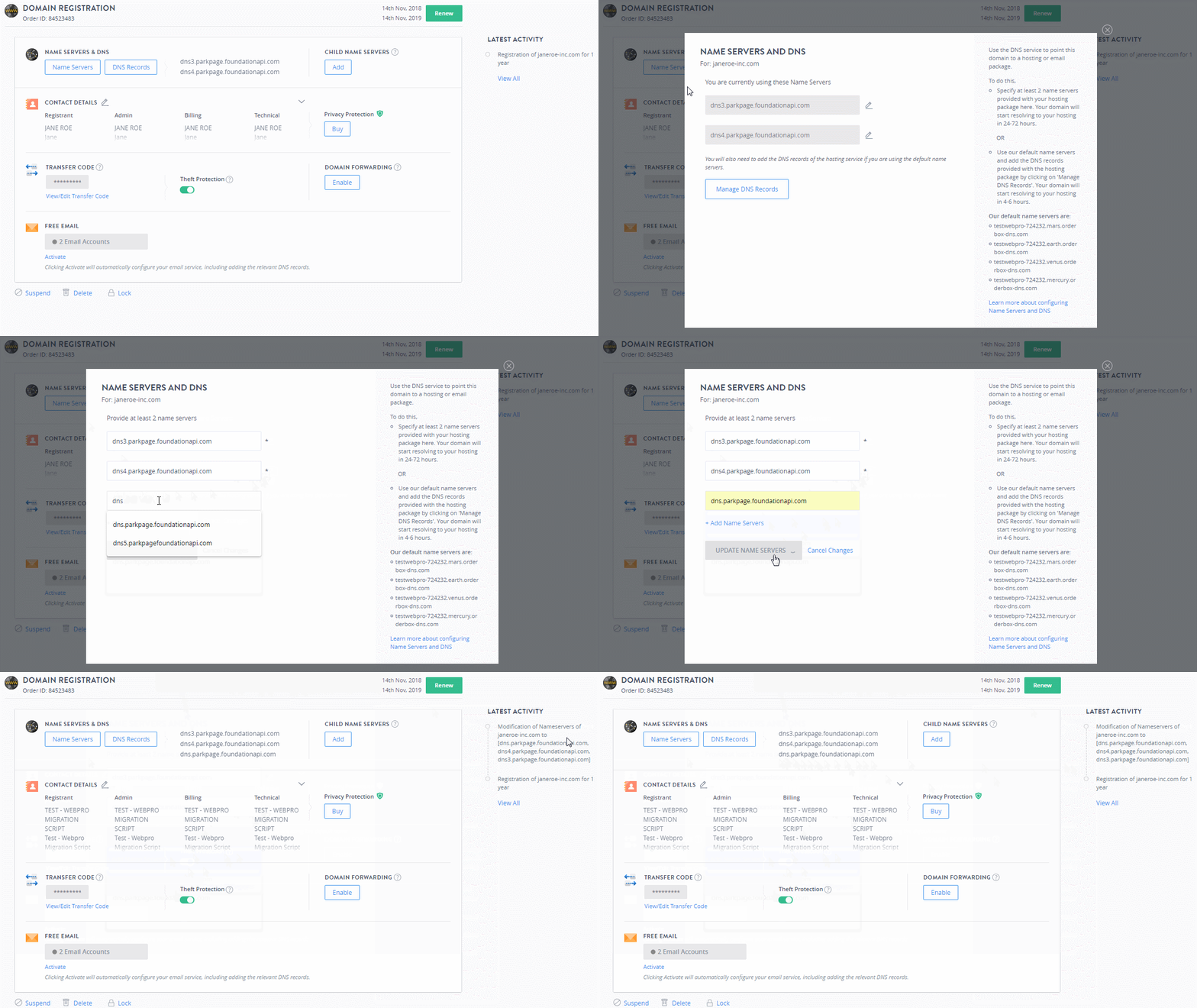
Step 3: Update the Name Servers.
-
Under the Name Servers & DNS section, click Name Servers.
-
You can enter a minimum of 2 name servers and a maximum of 13 Name Servers.
-
Click the
 icon to update/add Name Servers.
 -
Click + Add Name Servers to add additional Name Servers for your domain.
-
Once you enter the required name servers click UPDATE NAME SERVERS.
Upon modifying your domain name's Name Servers, your website would begin appearing in a web browser, after about 24 to 48 hours (provided your Web Hosting package is properly set up and you have uploaded the content of your website). This is a standard time-frame required for a process called as DNS Propagation to complete Worldwide. This process is not controlled by a single ISP or company and therefore it cannot be completed faster.
Name Server Modification Related Errors
-
If the Name Server(s) you are submitting has/have not been registered with the Registry, you will encounter the below error message:
Name server <nameserver> is not a valid name server
Please contact your Web Hosting Company and ask them to provide Name Servers that are valid and registered with the Registry.
-
You will encounter the below error message in case you try to set only 1 Name Server for a domain name extension that requires a minimum of 2 Name Servers:
There should be atleast 2 Nameserver(s)
Additional InformationMinimum number of Name Servers required for each domain name extension
-
You will encounter the below error message in case the domain name is Locked/Suspended at the Registry (and not in our system) or an outbound Transfer for the domain name to another Registrar is under process:
Domain Status does not allow this operation.
You may do the following to resolve either of these cases:
-
a lock/suspension at the Registry, contact our Support Team at to know the reason for lock/suspension and how the lock/suspension may be removed.
-
an outbound Transfer, you may
-
either cancel the Transfer through link listed in the email sent to the Registrant/Administrative Contact of the domain name and then perform the required Name Server modification, or
-
wait for the Transfer to complete and then carry out the desired Name Server modification at the New Registrar.
-
-
-
You may encounter a situation where you have modified the Name Servers of your Domain Name, and are viewing the cached results due to the DNS propagation delay. This issue can be addressed through the hosts file.
Additional Information